Question: I have installed Magento 2 One Step Checkout and the module works really well except “terms and conditions” tick box is not displayed.
Answer: You could go to Store => Terms and Conditions => Choose Terms and Conditions configuration, in Applied field, change it into Manually. Please have a look at the image below:
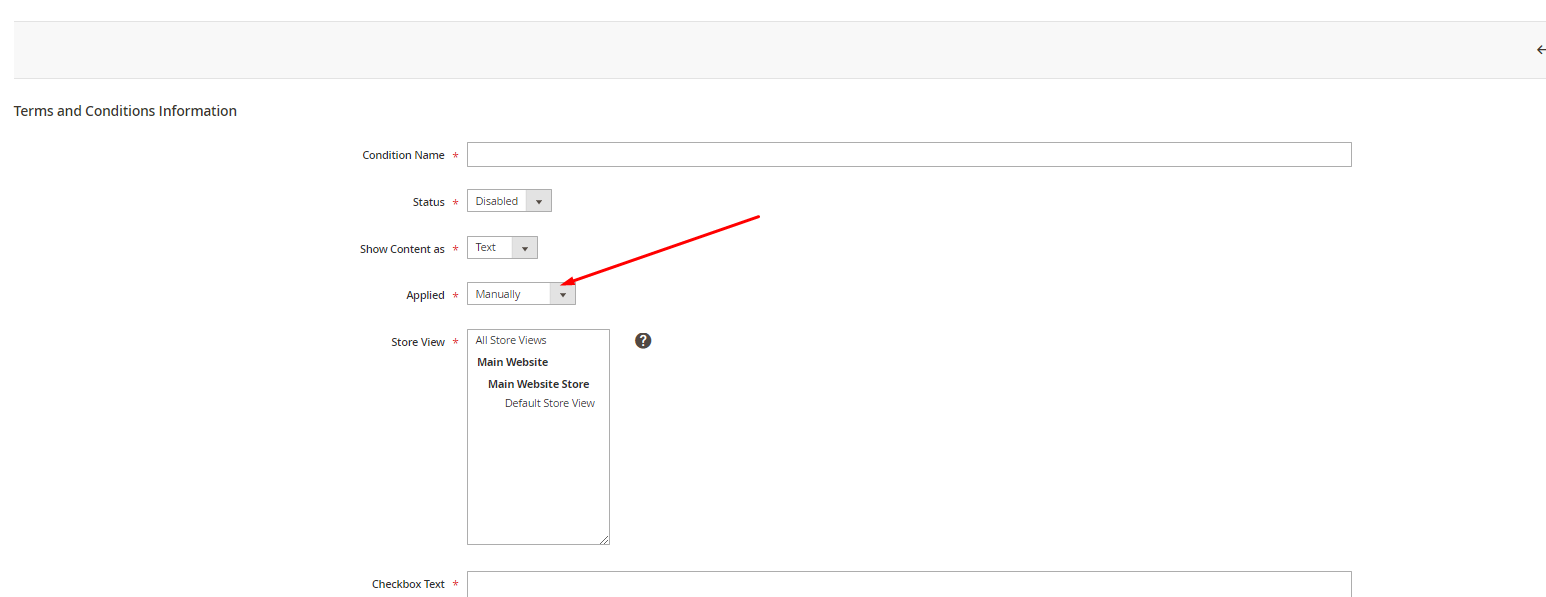
If you need further assistance, please don't hesitate to contact us.
Get to know us
BSS Commerce is a full-service ecommerce agency with 14+ years of experience, supporting 75,000+ customers worldwide. As an Adobe Commerce Solution Bronze Partner and Select Magento Extensions Builder, we deliver trusted end-to-end solutions.
Our core strength is Magento, with 150+ extensions designed to enhance store performance and drive growth. With deep expertise from years of working on Magento websites, we deliver scalable, high-impact solutions backed by strong client trust.
Discover our extensions: https://bsscommerce.com/magento-2-extensions.html
Here are our most powerful plugins:
- BSS Commerce’s Magento 2 B2B Extension enhances B2B performance with streamlined workflows and tailored pricing strategies.
- BSS Commerce’s Magento 2 SEO Extension improves rankings and maximizes organic growth through advanced SEO automation.
Was this article helpful?
That’s Great!
Thank you for your feedback
Sorry! We couldn't be helpful
Thank you for your feedback
Feedback sent
We appreciate your effort and will try to fix the article